


TL;DR
To keep an AI customer service agent under control, define exactly what it may answer and do, ground it in approved business knowledge, test it against messy real-world conversations, define safe fallback behavior, and set clear AI-to-human handoff rules. After launch, review real outcomes instead of optimizing for automation rate alone.
A production-ready AI agent isn't one that answers everything. It's one your team can test, control, and trust.
AI customer service agents can answer customers 24/7, handle repetitive questions, qualify buyers, and reduce the routine work that reaches your team.
But the hardest question usually comes right before launch: What happens when the AI doesn't know what to do?
What if it tells a customer their refund is definitely approved when it isn't? What if a buyer asking for 500 units in Germany keeps receiving the same generic shipping answer? What if a high-intent prospect is ready to discuss pricing, but the AI keeps answering instead of bringing in a salesperson?
These aren't just answer-quality problems. They're control failures.
A production AI agent shouldn't try to answer everything. It should handle the right conversations automatically, recognize its limits, and bring in a human before a bad answer costs you trust—or revenue.
What are AI agent guardrails in customer service?
AI agent guardrails are the rules and operational controls that define what an AI agent may say or do, which information it may use, when it should stop, and when another workflow or a human should take over.
- Role: Which customer problems the AI is responsible for
- Knowledge: Which approved business information it may use
- Instructions: How it should respond and what it must never claim
- Action boundaries: Which actions it may perform, recommend, or leave to a human
- Fallback: What happens when reliable information is missing
- Human handoff: When the conversation should move to a person
- Data boundaries: What sensitive information it must not reveal
- Monitoring: How the team identifies problems after deployment
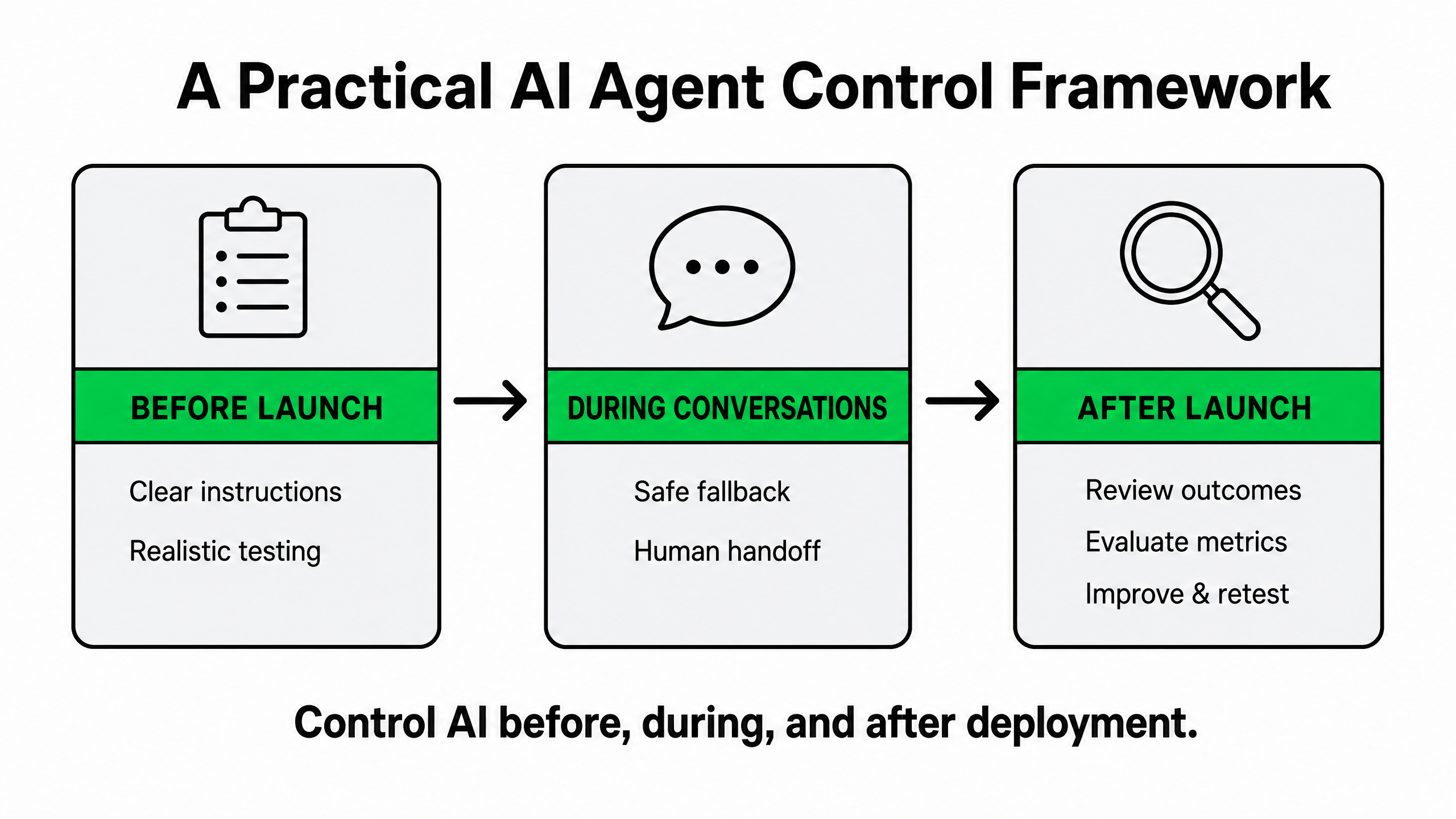
Guardrails aren't a single switch. They are decisions your team makes before launch, during customer conversations, and after the AI is running in production.
Instructions alone are not access controls. Follow OWASP’s guidance on least privilege and human approval: enforce permissions in connected tools and systems, limit access to necessary data, and require human approval for sensitive actions.
1. Define the AI agent's job—and its limits
Every AI agent needs a clearly defined job. “Help customers with refunds” isn't enough. The real question is: What can this agent handle on its own, and what requires more information or human judgment?
Too vague
Help customers with refunds.
Better
Explain the published refund policy using approved business information. Do not promise exceptions or confirm refund eligibility when required information is missing. Ask for the missing information first. Escalate exception requests or disputed cases to a human teammate.
The second instruction gives the AI a boundary and gives your team something concrete to test. For configuration steps, see the Mixdesk AI Agent setup guide.
A practical AI customer service guardrail template
| Boundary | Define |
|---|---|
| The AI can answer | Published product, shipping, returns, and service information from approved knowledge |
| The AI can ask | Order number, destination, product requirements, or other information needed to continue |
| The AI should escalate | Policy exceptions, payment disputes, sensitive complaints, high-value opportunities, or repeated failures |
| The AI must never do | Invent policies, expose sensitive information, make unauthorized promises, or claim an action was completed when it wasn't |
| When uncertain | Ask a useful clarifying question; if reliable information is still unavailable, use a fallback or hand off |
Different stages of the customer journey may need different agents. A pre-sales agent can answer product questions and collect purchasing requirements, while a post-sales support agent may use different knowledge, instructions, and escalation rules.
Useful rule: If your team can't clearly explain when the AI should say “I can't confirm that yet,” the instructions aren't finished.
2. Test real customer conversations—not just clean FAQs
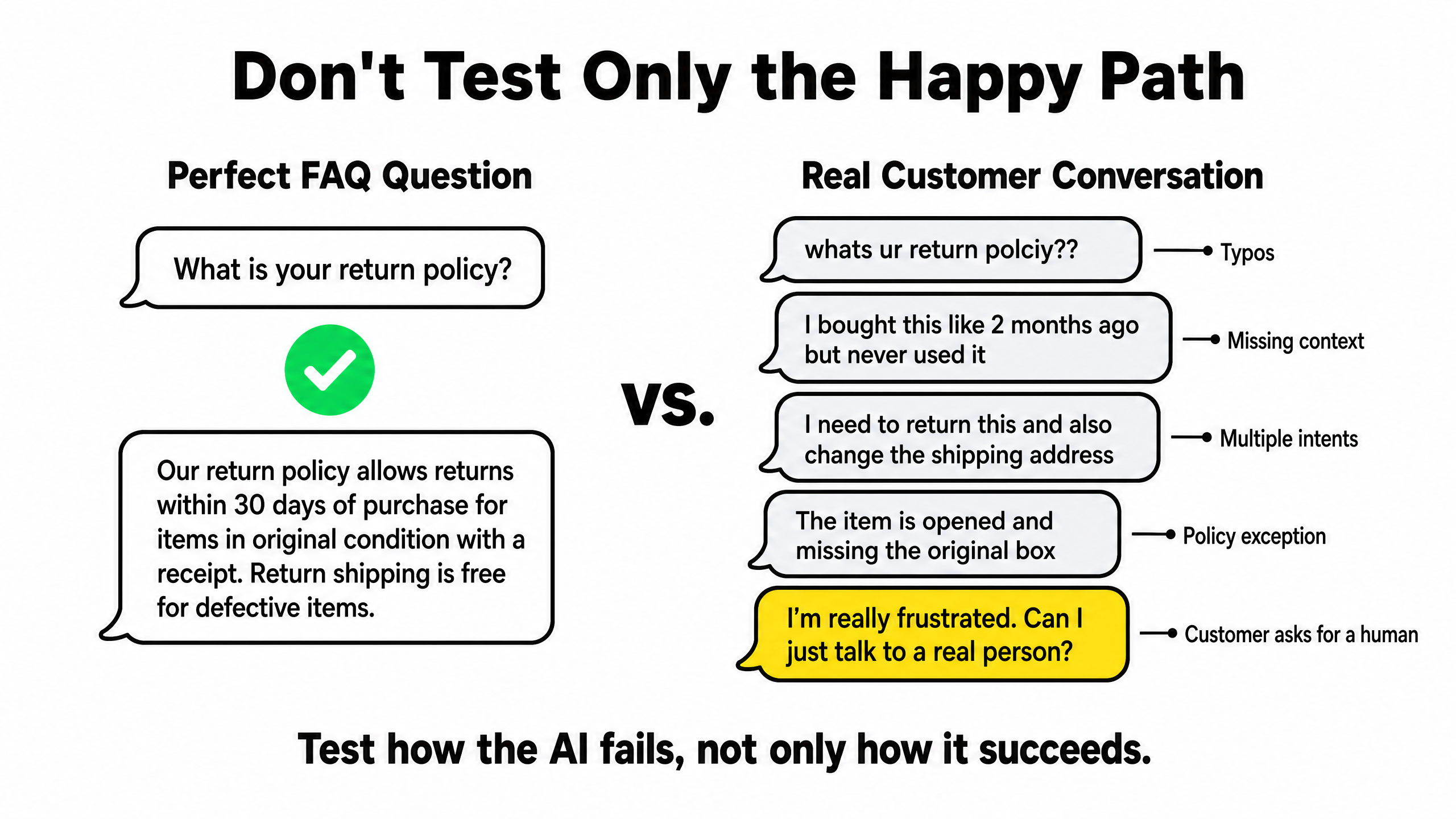
AI agents usually look good in demos. Ask “What is your return policy?” and the system finds the right information. Real customers are messier: they misspell product names, omit order numbers, switch topics, change languages, or send five short WhatsApp messages instead of one complete question.
A conversation that begins with “Do you ship to Germany?” may suddenly become “I need 500 units next week. Can you guarantee delivery?” Those are not equivalent conversations.
What should you test an AI customer service agent on?
| Scenario | What you need to know |
|---|---|
| Common questions | Does it answer high-volume requests consistently? |
| Different wording | Does it recognize the same intent when customers phrase it differently? |
| Missing information | Does it ask a useful follow-up rather than guessing? |
| Conflicting information | What happens when available knowledge is unclear or contradictory? |
| Multi-turn conversations | Does the workflow still make sense several messages later? |
| Language switching | Can it continue when the customer changes language? |
| Policy exceptions | Does it recognize that approval is required? |
| Sensitive information | Does it avoid revealing information it shouldn't? |
| Unauthorized actions | Does it avoid promising something outside its authority? |
| Unexpected instructions | What happens when a customer pushes it outside its defined role? |
| Request for a human | Does it hand off instead of continuing to “help”? |
| High purchase intent | Does a sales-ready conversation reach the right person quickly? |
A clean FAQ exchange proves the knowledge exists. It doesn't prove the agent can use it correctly when the conversation becomes messy. The goal is to discover how the AI fails before your customers do.
3. Define safe fallback behavior when the AI isn't sure
Don't force the AI to answer when it doesn't have enough reliable information.
An agent without a safe way to express uncertainty can fill gaps with something plausible. In customer service, plausible-but-wrong can be worse than no answer because the customer may act on it.
Bad fallback
Yes, your refund will definitely be approved.
Better fallback
I can explain our standard refund policy, but I can't confirm whether this order qualifies yet. Could you share your order number so I can get the right information?
If reliable information is still unavailable: “I can't confirm that from the information available. I'll pass the conversation to the right teammate along with the details you've already shared.”
Use this message only with a working handoff process, and confirm a transfer has completed only after it succeeds.
A useful fallback keeps the customer moving. It can ask for missing information, explain a limitation, point to approved information, route the conversation, or hand it to a human.
The safest AI isn't the one that never says “I don't know.” It's the one that handles uncertainty deliberately.
4. Design AI-to-human handoff before you need it
Human handoff isn't an AI failure. In many conversations, handoff is exactly the right AI decision.
A person may need to step in because the customer asks for one, the AI lacks reliable information, the same issue keeps repeating, an exception requires approval, the situation is sensitive, or the conversation needs judgment or negotiation.
It also matters for revenue.
Imagine a customer asking: “Can you ship 500 units to Germany next week? I need pricing today.”
The AI doesn't need to give a wildly wrong answer to lose the opportunity. It can simply keep serving generic shipping information until the buyer leaves. For a high-intent conversation, the agent's job may be to recognize the opportunity, collect what sales needs, and get the right person into the conversation quickly.
Sometimes the most valuable thing an AI agent can do is stop automating.
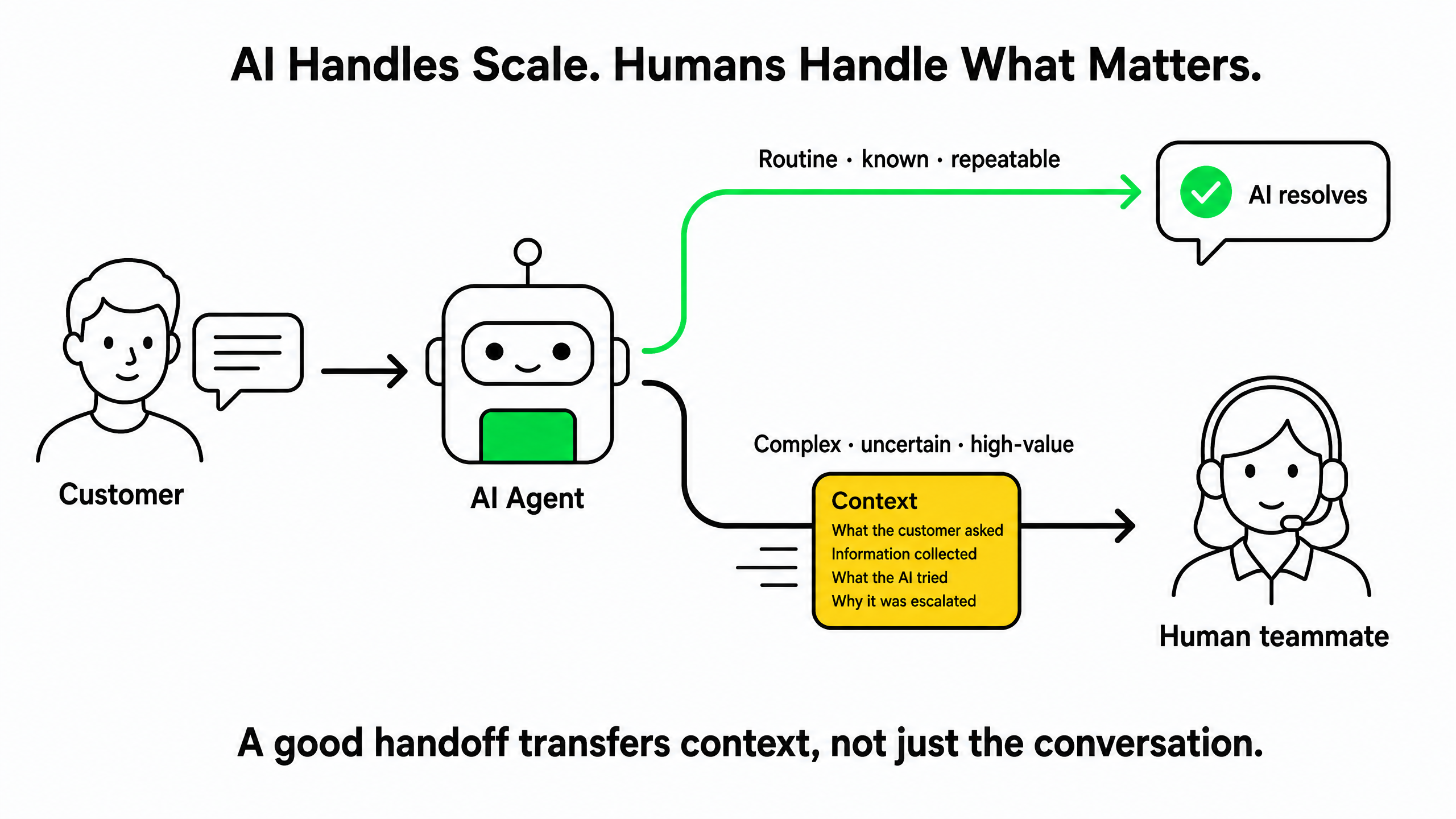
The handoff needs context, not just a transfer
A weak handoff looks like this: “AI: I’ll connect you with our team.” Then the human arrives: “Hi, how can I help?” Now the customer has to explain everything again.
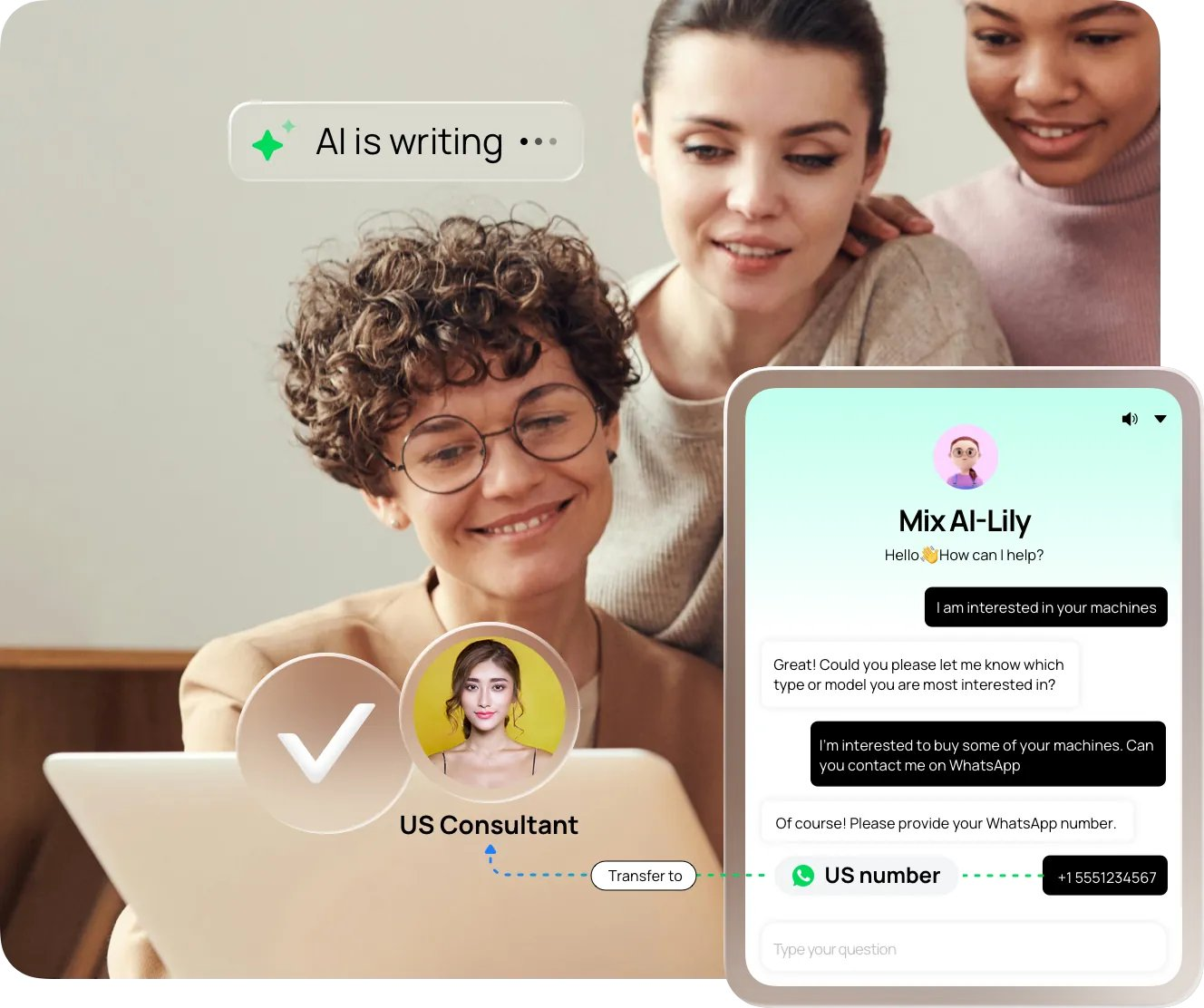
A strong handoff should carry forward what the customer asked, what information was collected, what the AI already tried, and why the conversation was escalated. During your pilot, test that the intended context reaches the human teammate.
5. Track what changed—and retest it
Customer-facing AI is rarely configured once and left alone. Products, policies, knowledge, instructions, workflow logic, and fallback rules all change. A fix for one conversation can quietly break another.
At minimum, keep a record of what changed, why it changed, when it changed, what should improve, and what needs retesting.
| Change | Why | Expected improvement | What to retest |
|---|---|---|---|
| Refund instruction updated | AI escalated exceptions too late | Earlier exception detection | Refund exceptions and missing order data |
| Shipping knowledge updated | New EU policy | More accurate delivery answers | Germany and France shipping questions |
| Handoff trigger updated | High-value leads stayed with AI too long | Faster sales response | Bulk order and quote requests |
You don't need sophisticated tooling to start. A shared change log is already better than having no record of what moved.
AI quality isn't a launch checklist. It's an operating process.
6. Measure outcomes—not just automation rate
Automation rate alone can’t tell you whether the agent is getting better. If more conversations stay with AI but customers return about the same issue, receive incorrect information, or reach humans without useful context, the cost has simply moved somewhere else.
AI customer service metrics worth reading together
| Metric | What it tells you |
|---|---|
| Resolution rate | Did the AI actually solve the customer's problem? |
| Escalation rate | How often does a human need to step in? |
| Repeat contacts | Did the customer return about the same problem? |
| Customer feedback | Was the experience useful from the customer's side? |
| Fallback rate | Where is the AI missing knowledge or certainty? |
| Incorrect answers | Where is the AI confidently wrong? |
| Handoff quality | Did the human receive enough context to continue? |
| Qualified handoff rate | Are valuable buyer conversations reaching sales? |
| Conversion after handoff | Do AI-qualified opportunities progress once a human joins? |
Read these metrics together. A falling escalation rate with rising repeat contacts can signal that the AI is handling conversations it should have escalated. A higher handoff rate can be healthy if those handoffs contain qualified opportunities that convert.
Is the AI resolving more customer problems while moving more valuable conversations forward?
How Mixdesk helps teams keep AI under control
Mixdesk combines AI Agents, automation, supported customer channels, and human teammates in the same customer engagement environment. The product pages also recommend defining topics the AI must not answer, setting escalation rules, and reviewing transcripts and lead quality before expanding a pilot.
- Role and knowledge: Configure AI Agents around defined roles and approved knowledge
- Fallback: Decide what happens when the AI cannot reliably handle a request
- Automation: Route conversations based on customer intent and workflow conditions
- Human handoff: Use workflows to move specific scenarios to teammates and verify context during testing
- Omnichannel workspace: Bring supported web, email, and social conversations into one service workspace
- Team collaboration: Let AI and human teammates share a defined service process
Good guardrails don't just prevent bad answers. They help the AI recognize when a conversation is too valuable to automate.
Guardrails are ultimately business decisions, not just software settings. A practical rollout is:
Understand the business → map customer conversations → configure the AI → build fallback and handoff workflows → test → launch → review real outcomes
AI customer service agent guardrails checklist
- Does it have a clearly defined role and explicit limits?
- Does it use current, approved business knowledge?
- Are its action and information boundaries clear?
- Have we tested messy real-world conversations instead of only clean FAQs?
- Do we know what happens when the AI is uncertain?
- Can customers reach a human when they need one?
- Does the intended context reach the human teammate?
- Are high-intent buyers routed to the right salesperson instead of getting stuck in automation?
- Can we identify what changed when performance shifts?
- Are we reviewing resolution, repeat contacts, handoff quality, and business outcomes after launch?
If several answers are no, increasing automation shouldn’t be your first priority.
Frequently asked questions
What are AI guardrails in customer service?
AI guardrails are the rules and operational controls that define what a customer-facing AI agent may say or do, which information it may use, and when it should stop, fall back, or hand the conversation to a human.
What should an AI agent do when it doesn't know the answer?
It shouldn't invent information. It can ask a clarifying question, explain what it cannot confirm, use an approved fallback, route the request to another workflow, or transfer the conversation to a human.
When should an AI customer service agent hand off to a human?
Common triggers include an explicit request for a person, insufficient information, repeated failed attempts, complaints or disputes, policy exceptions, sensitive situations, strong purchase intent, and conversations that require judgment or negotiation.
What should a good AI-to-human handoff include?
A good handoff should include what the customer asked, what information was collected, what the AI already attempted, and why the conversation was escalated. The customer shouldn’t have to repeat the entire conversation.
Can AI guardrails completely eliminate incorrect answers?
No. Guardrails can reduce the likelihood and impact of incorrect AI behavior, but they cannot guarantee that an AI agent will never produce a wrong answer. Clear boundaries, approved knowledge, realistic testing, safe fallback behavior, and human oversight all reduce the risk.
How should you measure whether an AI customer service agent works well?
Don’t rely on automation rate alone. Review resolution rate, repeat contacts, customer feedback, fallback rate, incorrect answers, escalation patterns, and handoff quality. For sales-related conversations, also track qualified handoffs and what happens after those opportunities reach a human.
Keep AI under control as you scale
The real test of an AI customer service agent isn't whether it can answer a perfect FAQ question. It's what happens when a customer provides incomplete information, asks for an exception, changes language, disputes a policy, requests a person, or becomes a high-value sales opportunity.
Clear instructions define the job. Realistic testing exposes edge cases. Safe fallbacks prevent uncertainty from turning into invented answers. Human handoff keeps complex and valuable conversations moving. Ongoing evaluation shows whether the AI is improving customer outcomes—not merely increasing automation.
The goal isn't to remove humans from customer conversations. It's to let AI handle what is predictable while getting the right human involved when judgment, trust, or revenue is on the line.