Plan before you buy
Which service and marketing workflows should you automate first?
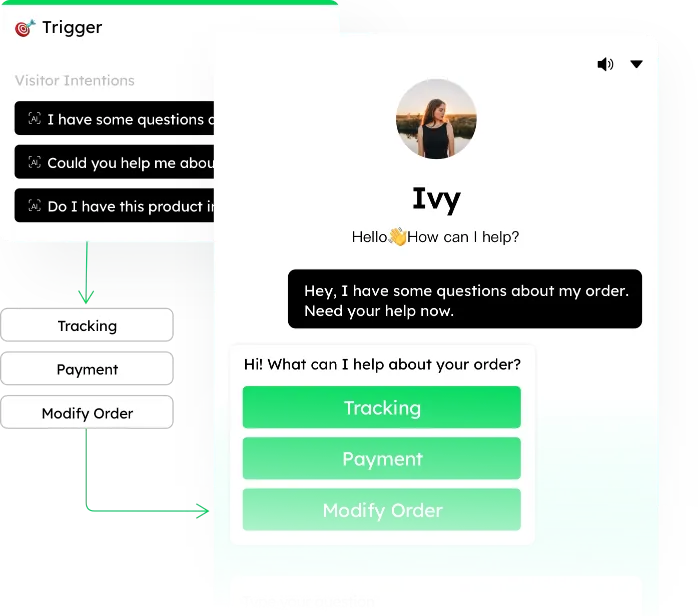
Start with a repeatable trigger, a clear owner and a safe fallback. Automation is useful only when the team can explain why each step ran.
Best-fit teams and scenarios
- Teams repeatedly routing, tagging, notifying or following up on the same conditions.
- Operations that need AI and human agents to share a defined service process.
- Managers who want consistent execution with visible exceptions and outcomes.
A practical rollout
- 1Map one current workflow, including trigger, data, owner and failure path.
- 2Build the smallest rule set and test it with internal or low-risk traffic.
- 3Review false triggers, handoffs and customer-facing messages.
- 4Add branches only after ownership and reporting are reliable.
Channels, data and integrations
- Conversation events, customer attributes, channel source and AI intent can trigger routing or follow-up.
- Workflows can coordinate AI responses, human queues and approved outbound messages.
- Confirm custom CRM fields, webhooks and order-system actions during solution design.
What to confirm before launch
- A workflow is only as reliable as its trigger data and exception handling.
- High-impact changes should require human review or a reversible step.
- Outbound messaging remains subject to each channel’s consent and template rules.
- Monitor stale rules when teams, products or policies change.
How to compare alternatives
Compare visual ease with auditability: can the team see the trigger, owner, failed step and final business outcome? Simple macros are useful, but cross-channel workflows also need permissions, handoff context and error recovery.
A verifiable customer result
Mixdesk’s published K Company exchange case describes handling roughly 10,000 daily support conversations and classifying 13 service scenarios before routing specialist cases. The article records the prior process, deployment choices and reported cost changes for review.
Read the full customer story →Questions to settle with your team
What is the safest first automation?+
Choose a high-volume, low-risk process with an obvious fallback, such as tagging and routing an approved intent to a named queue.
Can a person take over mid-workflow?+
Yes. Define handoff conditions and make sure the person receives the trigger, customer context and actions already completed.
How do we prevent silent failures?+
Assign an owner, log failed steps, alert the team and review exception volume as part of the rollout metric.
Validate it with your own workflow
Bring one repetitive workflow to the demo. We will map its trigger, human checkpoint, fallback and success metric before discussing expansion.