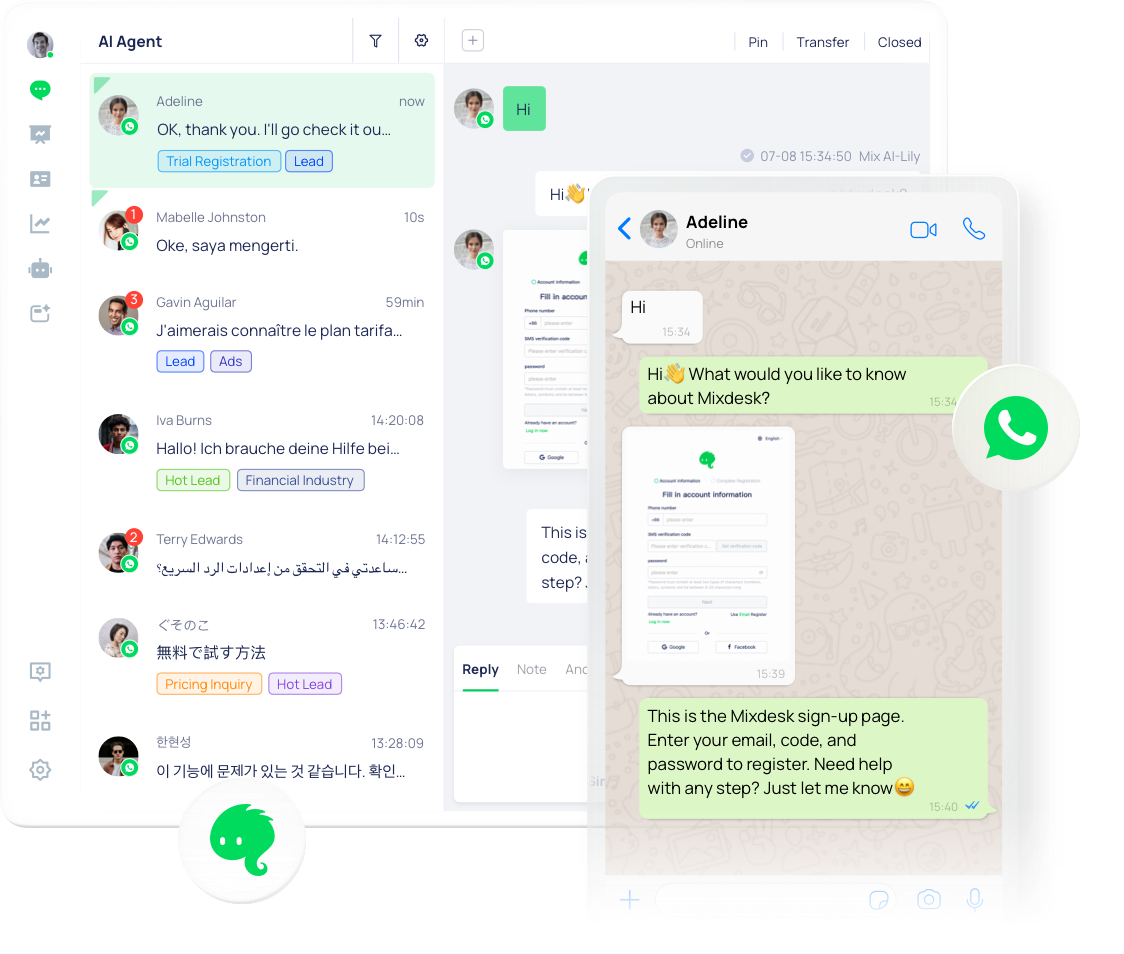
AI-native · Official WhatsApp Business Platform

Connect WhatsApp to an AI agent — in minutes

Authorize your number, point it at an AI agent, and let it answer, qualify and convert customers 24/7 across 27+ languages. No code, no per-seat fees.

  • Official WhatsApp Cloud API
  • No-code setup
  • No per-seat fees

Trusted by nearly 7,000 businesses worldwide

Trusted by global teams growing on WhatsApp

UTIEN PACK
RIPPA
WARRENSLOVE
KCEX
Titan
HOTCOIN
Anda Plastic
手手公益 Hand Hand
Mountain River Machinery
FuninVR
SeeGo
170WhatsApp accounts run by one teamRIPPA
93%of overseas leads capturedRIPPA
400,000+businesses served across the Meiqia product familyMeiqia
27+languages, answered 24/7Real-time translation

Based on the cumulative number of businesses served by Meiqia and its product family. Mixdesk is the global brand launched in 2024.

Official WhatsApp Business Platform

Connect through the official WhatsApp Cloud API

Mixdesk connects to WhatsApp through Meta's official Business Platform (Cloud API). Connect your WhatsApp Business number, and Mixdesk adds an AI agent, automation and a shared team inbox on top. Personal-number connection options may also be available depending on your setup.

  • Official Cloud API — built directly on Meta's WhatsApp Business Platform, not a grey-market workaround.
  • WhatsApp Business number — connect through Meta's official platform; personal-number options may also be available.
  • Guided onboarding — our team helps with WABA registration and verification so you're set up correctly.

Not sure how your number is set up? Our onboarding team reviews your account and handles the connection with you.

Connect WhatsApp to AI

From WhatsApp number to live AI agent in 3 steps

No developers, no middleman. Connect your account, add an AI agent, and let it start handling conversations the same day.

01

Connect with Meta

Use WhatsApp's official embedded signup — log in with Meta, choose your WhatsApp Business number and authorize Mixdesk. Our team can help with WABA registration and verification if needed.

Embedded signup · guided WABA setup
02

Add your AI agent

Build an AI agent in minutes — add your product knowledge, set its role and handoff rules. No code required.

Minutes to build · no code
03

AI starts handling chats

The AI answers, qualifies and converts customers 24/7 across 27+ languages, handing high-value conversations to your team with full context.

Live 24/7 · human handoff
Connect WhatsApp to AI

Built on the official WhatsApp Business Platform Cloud API.

Beyond the first reply

Manage the whole WhatsApp customer journey

Once connected, Mixdesk doesn't stop at answering — it runs the entire customer lifecycle on WhatsApp.

01

Connect

Click-to-WhatsApp ads, widgets and QR codes.

02

Engage

AI answers instantly, 24/7 across 27+ languages.

03

Qualify

Detect intent and capture leads before they go cold.

04

Hand off

Route high-value chats to your team with full context.

05

Re-engage

Approved templates reopen the conversation after the 24h window.

06

Convert

Close sales, drive reorders and keep customers coming back.

What your AI can do

Put AI to work on every WhatsApp chat

Build an AI agent in minutes that resolves most repetitive questions — then steps aside the moment a conversation needs a person.

  • Answer FAQs, recommend products and qualify leads automatically.
  • Reply across 27+ languages — configure the AI once, serve every market.
  • Recognize intent and call a tool to complete a request, not just reply.
  • Seamless human handoff with full conversation context.

AI handles scale. Humans handle value.

WhatsApp · inboundAI Agent active
¿Tienen envío a México y cuánto tarda?AI Agent · auto-translatedYes, we ship to Mexico in 5–7 business days. Want me to check stock for your size?Sí, talla 42AI AgentSize 42 is in stock — I've saved your details and I'm connecting you to a specialist to finish the order.Ana · SupportHola! I can complete your order right now.

One channel, every team

Sales, support, marketing and operations — all on WhatsApp

Pick a team to see how they run on Mixdesk.

Turn WhatsApp chats into qualified leads

Reply to Click-to-WhatsApp ad clicks instantly, day or night — before they go cold.

  • Reply to ad clicks instantly, day or night.
  • AI qualifies intent and answers product questions.
  • Hand hot leads to sales with full context.
  1. 1Click-to-WhatsApp adFacebook / Instagram / Google
  2. 2AI conversation & qualificationIntent detected, questions answered
  3. 3Lead captured & handed to SalesFull context, ready to close

Team collaboration

One WhatsApp inbox for your whole team

Sales, support and operations work the same conversations together — with routing, assignment and internal notes built in.

  • Route by team, language or product; assign owners in a click.
  • Manage multiple WhatsApp numbers and accounts in one view.
  • Real-time two-way translation across 27+ languages.

Unlimited seats. No per-seat fees. Bring your whole team — you'll never pay more for adding agents.

Multi-account and channel limits vary by plan; large-scale deployments are custom-configured.

Grow & re-engage

Re-engage customers beyond the first conversation

Turn WhatsApp into a proactive revenue channel — segment your audience, schedule broadcasts, and reopen chats with Meta-approved templates. Replies land right back in the shared inbox.

  • Segment audiences and personalize with variables.
  • Schedule campaigns across global time zones.
  • Re-engage after the 24-hour window with approved templates.
  • Replies flow back to your AI or team in the shared inbox.

Promotional messages are subject to Meta opt-in, template and messaging-window policies.

Marketing

Hi {{first_name}} — the item you viewed is now 10% off. Want me to reserve it?

Meta-approved template

Utility

Your order {{order_id}} has shipped and will arrive in 3–5 days. Track it here.

Meta-approved template

Authentication

Your Mixdesk verification code is {{code}}. It expires in 10 minutes.

Meta-approved template

How the 24-hour service window works: when a customer messages you, a 24-hour window opens and you can send free-form service replies. After it closes, re-engage with a Meta-approved template — and once the customer replies, a new window opens.

RIPPAGlobal machinery & trade
“WhatsApp went from a scattered inbox to our highest-converting sales channel.”

Unifying 23 channel sources into one AI-powered workspace.

Read the RIPPA story
93%Overseas lead capture rateContacts captured before leads go cold
+30%Deal conversion liftMore qualified chats reaching sales
80 hrsSaved per weekAI handling the repetitive volume
23Channel sources unifiedAll managed from one workspace

Pricing

How much does WhatsApp cost with Mixdesk?

Two things can carry a cost — Meta's messaging fees and your Mixdesk plan. Adding teammates never does.

WhatsApp messaging fees

Paid to Meta, not Mixdesk. WhatsApp charges are set by Meta and depend on message category and volume.

Billed by Meta

Mixdesk platform subscription

Your plan covers the platform and AI capability — shared inbox, automation, AI agents, broadcasts and integrations.

Depends on your plan & usage

No per-seat fees

Add your whole sales, support and operations team. Mixdesk never charges for extra agents.

Unlimited seats included

Mixdesk does not charge per seat. A platform subscription and WhatsApp messaging charges may apply depending on your plan and usage.See full pricing

Already on WhatsApp elsewhere?

Move to Mixdesk without starting over

Whether you're on the WhatsApp Business App or another provider, our team helps you connect to Mixdesk on the official WhatsApp Business Platform — without starting from scratch.

  • Guided onboarding — our team helps with WABA registration, verification and getting connected on the official platform.
  • Bring your whole team — one shared inbox for everyone, with no per-seat fees.
  • AI from day one — add an AI agent, automation and 27+ language translation on top.
  1. Tell us your current setupBusiness App or another provider
  2. We plan the move with youNumber, team and go-live steps
  3. 3Go live on MixdeskWith AI agent and shared inbox

Works with your stack

CozeDifyCRMAPIsSDKs

CRM sync, open APIs and native agent integrations.Explore integrations

FAQ

Everything about WhatsApp on Mixdesk

Connecting, what AI can take over, moving from somewhere else, and what it costs.

Getting started

How do I connect my WhatsApp account to an AI agent?
Three steps. Connect your WhatsApp Business number through Meta's official WhatsApp Business Platform, point it at an AI agent you build in Mixdesk in minutes, and it starts answering, qualifying and converting customers 24/7 — handing high-value chats to your team with full context.
How long does it take to go live?
Most teams connect a number and build a working AI agent in minutes — no code required. Our team also provides WABA registration and verification support if your business still needs to get approved.
Do I need a new phone number for WhatsApp?
Connect your WhatsApp Business number through Meta's official WhatsApp Business Platform. Personal-number connection options may also be available depending on your setup. Our team helps with WABA registration and verification during onboarding.

Product

Does Mixdesk support both the WhatsApp Business API and personal numbers?
Mixdesk supports WhatsApp Business numbers through Meta's official WhatsApp Business Platform. Personal-number connection options may also be available depending on your setup. Teams managing multiple accounts can do so in one place.
Can AI handle WhatsApp conversations on its own?
Yes. Mixdesk AI agents answer FAQs, recommend products, qualify leads and route conversations 24/7 across 27+ languages. Configure the AI in one language and it responds across all of them, escalating complex or high-value chats to a human with full context.
Can multiple team members work from one WhatsApp number?
Yes. Your whole team shares one WhatsApp inbox in Mixdesk — no one juggles a single phone. Route conversations by team, language or product, assign owners, add internal notes, and keep the full history even as people join or leave.

Migrating to Mixdesk

I'm already using the WhatsApp Business App — how do I switch to Mixdesk?
Mixdesk runs on the official WhatsApp Business Platform (Cloud API), which is separate from the consumer WhatsApp Business App. Our team helps you connect a number to the platform and set up your AI agent, shared inbox and automation, so you move over without losing your customers.
Can I move to Mixdesk from another WhatsApp provider?
Yes. You can bring your existing WhatsApp Business number to Mixdesk, and our team helps you plan the move and get set up — including WABA registration and verification — so you don't have to start over.

Pricing & policy

Does Mixdesk charge per seat for WhatsApp?
No. Mixdesk does not charge per-seat fees. You can bring your entire sales, support and operations team into one shared WhatsApp inbox without paying for each agent.
How much does WhatsApp cost with Mixdesk?
Mixdesk does not charge per seat. A Mixdesk platform subscription and WhatsApp messaging charges may apply depending on your plan and usage — WhatsApp messaging fees are set by Meta based on message category and volume. See pricing or talk to our team for details.
What is the WhatsApp 24-hour service window?
When a customer messages your business on WhatsApp, a 24-hour service window opens during which you can send free-form service replies. After 24 hours, you re-engage the customer using a Meta-approved message template. Once they reply, a new 24-hour window opens.

Put AI to work on WhatsApp today

Authorize your number, add an AI agent, and let it handle conversations 24/7 — no code, no per-seat fees.

Free to start · No credit card · Unlimited seats — see plan limits