
Retrieve conversations, contacts, and other data through the API.
Before you start
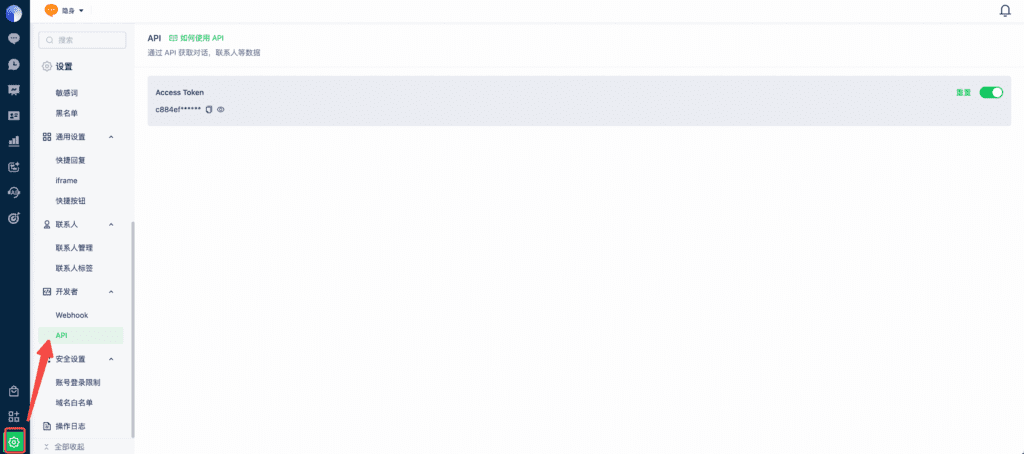
Go to Settings > API, obtain an Access Token, and enable it.
General requirements
- All APIs below require an Access Token. Resetting it invalidates the previous token. Request header:
Authorization: Bearer YOUR_ACCESS_TOKEN- All request and response time fields use millisecond-level UTC ISO 8601 format. Example: 2024-01-01T00:00:00.000Z
Endpoints
1. Query conversations
Note: Only the most recent six months of data are available.
1.1 Conversation model
| Field name | Type | Description |
| ent_id | integer | Workspace ID |
| client_info | object | Contact information |
| agent_name | string | Team member’s real name |
| agent_id | integer | Team member ID |
| agent_nick_name | string | Team member’s display name |
| agent_work_num | string | Employee ID |
| agent_email | string | Team member’s email |
| agent_group_name | string | Team group name |
| conv_id | integer | Conversation ID |
| track_id | string | Conversation visit identifier |
| conv_tags | array(string) | Conversation tags |
| conv_start_time | string | Conversation creation time |
| conv_end_time | string | Conversation end time |
| conv_type | integer | Conversation type: 1 = direct message, 2 = group |
| summary | string | Conversation summary |
| summary_time | string | Summary time |
| evaluation | integer | Rating: 0 = negative, 1 = neutral, 2 = positive |
| evaluation_content | string | Rating content |
| source_type | string | Traffic source |
| source_url | string | Source URL |
| source | string | Conversation channel |
| sub_source | string | Subchannel name |
| sub_source_remark | string | Subchannel notes |
| visit_page_title | string | Landing page title |
| visit_page_url | string | Landing page URL |
| conv_title | string | Conversation page title |
| conv_url | string | Conversation page URL |
| search_engine | string | Search engine |
| visitor_os | string | Operating system |
| visitor_browser | string | Browser |
| visitor_location | string | Region |
| browser_language | string | Browser language |
| utm_source | string | utm_source |
| utm_medium | string | utm_medium |
| utm_term | string | utm_term |
| utm_content | string | utm_content |
| utm_campaign | string | utm_campaign |
| messages | array(object) | Conversation message list |
| source_client_info | object | Channel profile information; available for third-party channels. |
client_info fields:
| Field name | Type | Description |
| contact_id | string | Contact ID |
| track_ids | array(string) | Visit identifiers |
| tags | array(string) | Contact tags |
| system_fields | object | System fields that are enabled for display |
| custom_fields | object | Custom fields that are enabled for display |
messages fields:
| Field name | Type | Description |
| agent_name | string | Real name of the team member associated with the message |
| agent_token | string | Token of the team member associated with the message |
| from | string | Message source |
| timestamp | string | Message time |
| content | string | Message content |
| type | string | Message type |
| source_username | string | Third-party channel username (Facebook, Instagram, Telegram, LINE, WhatsApp API, WhatsApp App, or Email) |
| group_sender_id | string | Group user ID. Supported by WhatsApp App, LINE, and Telegram. WhatsApp App uses + followed by the phone number; other channels use the user ID. |
source_client_info fields:
| Field name | Type | Description |
| user_id | string | User ID on the third-party channel |
| gender | string | Gender |
| locale | string | Locale |
| timezone | int | Time zone |
| user_name | string | User name |
1.2 Get a conversation by ID
Endpoint:
GET https://api-gateway.mixdesk.com/mixdesk/hikari/open/api/v1/conversation/{conversation_id}Request parameters:
| Parameter | Parameter type | Type | Required | Description |
| conversation_id | Path | integer | Yes | Conversation ID |
Response parameters:
| Field name | Type | Description |
| code | integer | Status code |
| msg | string | Message |
| success | boolean | Whether the request succeeded |
| data | Conversation model | Conversation model |
1.3 List conversations by end time
Endpoint:
GET https://api-gateway.mixdesk.com/mixdesk/hikari/open/api/v1/conversationsRequest parameters:
| Parameter | Parameter type | Type | Required | Description |
| end_time_start | query | string | Yes | Start of the conversation-end-time range |
| end_time_end | query | string | Yes | End of the conversation-end-time range |
| page | query | integer | No | Page number, starting at 1. Default: 1. |
| page_size | query | integer | No | Page size, from 1 to 50. Default: 20. |
Response parameters:
| Field name | Type | Description |
| code | integer | Status code |
| msg | string | Message |
| success | boolean | Whether the request succeeded |
| data | object | Conversation list data |
data fields:
| Field name | Type | Description |
| total | integer | Total matching conversations |
| data | array(conversation model) | Conversation records |
2. Query contacts
Contact fields are returned only when enabled for display in the system.
2.1 Contact model
| Field name | Type | Description |
| contact_id | string | Contact ID |
| track_ids | array(string) | Visit identifiers |
| system_fields | object | System fields |
| system_fields.sources | array(object) | All channel information for the contact. Merged contacts can contain multiple entries; duplicates are not removed. |
| custom_fields | object | Custom fields |
| source_client_info | array(object) | Third-party channel profile information, keyed by track_id. Merged contacts may contain multiple keys. |
2.2 List contacts by creation time
Endpoint:
GET https://api-gateway.mixdesk.com/mixdesk/hikari/open/api/v1/contactsRequest parameters:
| Parameter | Parameter type | Type | Required | Description |
| create_time_start | query | string | Yes | Start of the contact-creation-time range |
| create_time_end | query | string | Yes | End of the contact-creation-time range |
| page | query | integer | No | Page number, starting at 1. Default: 1. |
| page_size | query | integer | No | Page size, from 1 to 50. Default: 20. |
Response parameters:
| Field name | Type | Description |
| code | integer | Status code |
| msg | string | Message |
| success | boolean | Whether the request succeeded |
| data | object | Contact list data |
data fields:
| Field name | Type | Description |
| total | integer | Total matching contacts |
| data | array(contact model) | Contact records |
3. Send messages to Telegram
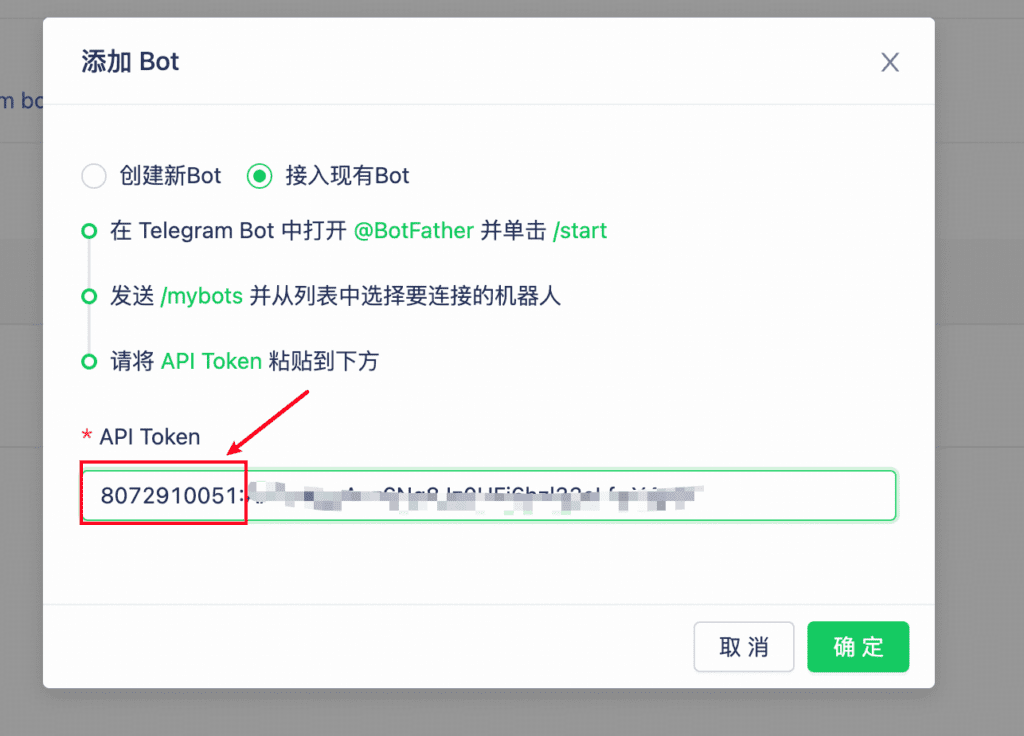
The Telegram bot ID is the numeric prefix of the token used when connecting the bot.
Find chat_user_id:
1. In the conversation’s right sidebar, use the value of the ID field in channel profile information.
2. Use the value returned by the API or webhook in source_client_info.user_id
3.1 Send-message model
| Field name | Type | Description |
| tg_bot_id | string | Telegram bot ID |
| chat_user_id | string | Conversation user ID: negative for groups, positive for individuals |
| message_list | array | Messages to send: 1–10 items |
| message_list.message_type | string | Message type. Allowed value: text |
| message_list.content | string | Message text: 1–1,024 characters |
3.2 Send text messages
Endpoint:
POST https://api-gateway.mixdesk.com/mixdesk/hikari/open/api/v1/telegram/sendContent-Type: application/json;
Request parameters:
Send-message model in JSON format
Response parameters:
| Field name | Type | Description |
| code | integer | Status code |
| msg | string | Message |
| success | boolean | Whether the request succeeded |
| data | object | Send result |
data fields:
| Field name | Type | Description |
| message_list | array | Message |
message_list fields:
| Field name | Type | Description |
| conv_id | int64 | Conversation ID |
| msg_id | int64 | Message ID |
Example
curl --location --request POST 'https://api-gateway.mixdesk.com/mixdesk/hikari/open/api/v1/telegram/send' \
--header 'Content-Type: application/json' \
--header 'Authorization: Bearer YOUR_API_TOKEN' \
--data-raw '{
"tg_bot_id":"YOUR_BOT_ID",
"chat_user_id":"RECIPIENT_USER_ID",
"message_list":[
{
    "message_type":"text",
    "content":"Hello!"
}
]
}'
4. Team-member workload
Endpoint:
GET https://api-gateway.mixdesk.com/mixdesk/hikari/open/api/v1/agent_serviceRequest parameters:
| Parameter | Type | Required | Example | Description |
| create_time_start | string | Yes | 2025-07-10T00:00:00.000Z | Start of the conversation-end-time range |
| create_time_end | string | Yes | 2025-07-18T00:00:00.000Z | End of the conversation-end-time range |
Example response:
{
    "code": 1,
    "msg": "",
    "success": true,
    "data": [
        {
            "agent_id": 13,
            "agent_name": "Super Administrator",
            "group_id": 11,
            "group_name": "Default Group",
            "work_num": "",
            "conv_cnt": 0,
            "effective_conv_cnt": 0,
            "effective_conv_rate": 0,
            "missed_conv_cnt": 0,
            "missed_conv_rate": 0,
            "msg_cnt": 0,
            "duration_time": 0,
            "conv_first_response_wait_time": 0,
            "avg_response_wait_time": 0,
            "transfer_in_cnt": 0,
            "transfer_out_cnt": 0,
            "invited_eval_num": 0,
            "good_conv_cnt": 0,
            "medium_conv_cnt": 0,
            "bad_conv_cnt": 0,
            "eval_num": 0,
            "eval_rate": 0,
            "bad_evaluate_rate": 0,
            "medium_evaluate_rate": 0,
            "good_evaluate_rate": 0,
            "avg_evaluate_score": 0,
            "avg_human_duration_time": 0
        },
        {
            "agent_id": 486,
            "agent_name": "yyy",
            "group_id": 11,
            "group_name": "Default Group",
            "work_num": "002",
            "conv_cnt": 0,
            "effective_conv_cnt": 0,
            "effective_conv_rate": 0,
            "missed_conv_cnt": 0,
            "missed_conv_rate": 0,
            "msg_cnt": 0,
            "duration_time": 0,
            "conv_first_response_wait_time": 0,
            "avg_response_wait_time": 0,
            "transfer_in_cnt": 0,
            "transfer_out_cnt": 0,
            "invited_eval_num": 0,
            "good_conv_cnt": 0,
            "medium_conv_cnt": 0,
            "bad_conv_cnt": 0,
            "eval_num": 0,
            "eval_rate": 0,
            "bad_evaluate_rate": 0,
            "medium_evaluate_rate": 0,
            "good_evaluate_rate": 0,
            "avg_evaluate_score": 0,
            "avg_human_duration_time": 0
        }
    ]
}
Parameter descriptions:
| Field | Parameter |
| Team member ID | agent_id |
| Team member’s real name | agent_name |
| Team group | group_name |
| Team group ID | group_id |
| Employee ID | work_num |
| Total conversations | conv_cnt |
| Total valid conversations | effective_conv_cnt |
| Valid conversation rate | effective_conv_rate |
| Missed conversations | missed_conv_cnt |
| Missed conversation rate | missed_conv_rate |
| Total messages | msg_cnt |
| Transferred-out conversations | transfer_out_cnt |
| Transferred-in conversations | transfer_in_cnt |
| Average conversation duration (seconds) | duration_time |
| Average human-handled conversation duration | avg_human_duration_time |
| Average first response time | conv_first_response_wait_time |
| Average response time | avg_response_wait_time |
| Manually sent rating invitations | invited_eval_num |
| Rating count | eval_num |
| Rating rate | eval_rate |
| Positive ratings | good_conv_cnt |
| Positive rating rate | good_evaluate_rate |
| Neutral ratings | medium_conv_cnt |
| Neutral rating rate | medium_evaluate_rate |
| Negative ratings | bad_conv_cnt |
| Negative rating rate | bad_evaluate_rate |
| Average rating score | avg_evaluate_score |
Response parameters:
| Field name | Type | Description |
| code | integer | Status code |
| msg | string | Message |
| success | boolean | Whether the request succeeded |
| data | object | Contact list data |
5. Send messages to Facebook
After connecting the channel, find PageID in the Page ID column.
Find the conversation user ID:
1. In the conversation’s right sidebar, use the value of the ID field in channel profile information.
2. Use the value returned by the API or webhook in source_client_info.user_id
5.1 Send-message model
| Field name | Type | Description |
| page_id | string | Required. PageID. |
| chat_user_id | string | Required. Conversation user ID. |
| tag | string | When the user’s last message was more than 24 hours ago but within seven days, use <HUMAN_AGENT>. After seven days, use an applicable tag: <ACCOUNT_UPDATE> for account-information, status, or security updates; <CONFIRMED_EVENT_UPDATE> for an accepted event or appointment and related changes; or <POST_PURCHASE_UPDATE> for transaction, shipment, or order updates. |
| message_list | array | Required. Messages to send: 1–10 items. |
| message_list.message_type | string | Message type: text, photo, video, audio, or file |
| message_list.content | string | Message text: 1–1,024 characters |
| message_list.photo | object | |
| message_list.photo.url | string | Supports .jpg, .gif, and .png, up to 5 MB |
| message_list.video | object | |
| message_list.video.url | string | Up to 25 MB |
| message_list.video.file_name | string | File name |
| message_list.video.size | int | File size |
| message_list.audio | object | |
| message_list.audio.url | string | Supports m4a and ogg, up to 10 MB and 60 seconds. m4a is recommended. |
| message_list.file | object | |
| message_list.file.url | string | Up to 25 MB. ZIP files are not supported. |
| message_list.file.file_name | string | File name |
| message_list.file.size | int | File size |
5.2 Send messages
Endpoint:
POST https://api-gateway.mixdesk.com/mixdesk/hikari/open/api/v1/messenger/sendContent-Type: application/json; charset=utf-8
Request parameters:
Send-message model in JSON format
Response parameters:
| Field name | Type | Description |
| code | integer | Status code |
| msg | string | Message |
| success | boolean | Whether the request succeeded |
| data | object | Send result |
data fields:
| Field name | Type | Description |
| message_list | array | Message |
message_list fields:
| Field name | Type | Description |
| conv_id | int64 | Conversation ID |
| msg_id | int64 | Message ID |
Example
curl --location --request POST 'https://api-gateway.mixdesk.com/mixdesk/hikari/open/api/v1/messenger/send' \
--header 'Authorization: Bearer YOUR_API_TOKEN' \
--header 'Content-Type: application/json' \
--data-raw '{
    "page_id": "page_id",
    "chat_user_id": "chat_user_id",
    "tag": "",
    "message_list": [
        {
            "message_type": "text",
            "content": "123"
        },
        {
            "message_type": "photo",
            "photo": {
                "url": "url"
            }
        },
        {
            "message_type": "video",
            "video": {
                "url": "url",
                "file_name": "hello",
                "size":100
            }
        },
        {
            "message_type": "audio",
            "audio": {
                "url": "url"
            }
        },
        {
            "message_type": "file",
            "file": {
                "url": "url",
                "file_name": "image",
                "size": 100
            }
        }
    ]
}'
6. Send messages to WhatsApp App
After connecting the channel, find phone_number in the Phone Number column. Do not include the + sign.
Find the conversation user ID
- Use a known user or group ID. User IDs use phone-number@c.us, for example 8618888888888@c.us. Group IDs use digits@g.us, for example 1201111111111111111111@g.us.
- Use the value returned by the API or webhook in
source_client_info.user_id
6.1 Send-message model
| Field name | Type | Description |
| phone_number | string | Required. Phone number of the connected personal account, for example 8618888888888. |
| chat_user_id | string | Required. Recipient user or group ID |
| message_list | array | Required. Messages to send: 1–10 items. |
| message_list.message_type | string | Message type: text, photo, video, audio, or file |
| message_list.content | string | Message text: 1–1,024 characters |
| message_list.photo | object | |
| message_list.photo.url | string | Supports .jpg, .gif, and .png, up to 5 MB |
| message_list.video | object | |
| message_list.video.url | string | Up to 25 MB |
| message_list.video.file_name | string | File name |
| message_list.video.size | int | File size |
| message_list.audio | object | |
| message_list.audio.url | string | Supports m4a and ogg, up to 10 MB and 60 seconds. m4a is recommended. |
| message_list.file | object | |
| message_list.file.url | string | Up to 25 MB. ZIP files are not supported. |
| message_list.file.file_name | string | File name |
| message_list.file.size | int | File size |
6.2 Send messages
Endpoint: POST https://api-gateway.mixdesk.com/mixdesk/hikari/open/api/v1/pwa/send
Content-Type: application/json; charset=utf-8
Request parameters:
Send-message model in JSON format
Response parameters:
| Field name | Type | Description |
| code | integer | Status code |
| msg | string | Message |
| success | boolean | Whether the request succeeded |
| data | object | Send result |
data fields:
| Field name | Type | Description |
| message_list | array | Message |
message_list fields:
| Field name | Type | Description |
| conv_id | int64 | Conversation ID |
| msg_id | int64 | Message ID |
Example
curl --location --request POST 'https://api-gateway.mixdesk.com/mixdesk/hikari/open/api/v1/pwa/send' \
--header 'Authorization: Bearer YOUR_API_TOKEN' \
--header 'Content-Type: application/json' \
--data-raw '{
    "phone_number": "phone_number",
    "chat_user_id": "chat_user_id",
    "message_list": [
        {
            "message_type": "text",
            "content": "123"
        },
        {
            "message_type": "photo",
            "photo": {
                "url": "url"
            }
        },
        {
            "message_type": "video",
            "video": {
                "url": "url",
                "file_name": "hello",
                "size":100
            }
        },
        {
            "message_type": "audio",
            "audio": {
                "url": "url"
            }
        },
        {
            "message_type": "file",
            "file": {
                "url": "url",
                "file_name": "image",
                "size": 100
            }
        }
    ]
}'
7. Send messages to the Web channel
A Web visitor must have created a conversation before a track_id is available.
- In conversation details, find the Visit Identifier value in the contact information on the right.
7.1 Send-message model
| Field name | Type | Description |
| track_id | string | Required. Visit identifier. |
| message_list | array | Required. Messages to send: 1–10 items. |
| message_list.message_type | string | Message type: text, photo, video, audio, or file |
| message_list.content | string | Message text: 1–1,024 characters |
| message_list.photo | object | |
| message_list.photo.url | string | Supports .jpg, .gif, and .png, up to 5 MB |
| message_list.video | object | |
| message_list.video.url | string | Up to 25 MB |
| message_list.video.file_name | string | File name |
| message_list.video.size | int | File size |
| message_list.audio | object | |
| message_list.audio.url | string | Supports m4a and ogg, up to 10 MB and 60 seconds. m4a is recommended. |
| message_list.file | object | |
| message_list.file.url | string | Up to 25 MB. ZIP files are not supported. |
| message_list.file.file_name | string | File name |
| message_list.file.size | int | File size |
7.2 Send text messages
Endpoint: POST https://api-gateway.mixdesk.com/mixdesk/hikari/open/api/v1/web/send
Content-Type: application/json; charset=utf-8
Request parameters:
Send-message model in JSON format
Response parameters:
| Field name | Type | Description |
| code | integer | Status code |
| msg | string | Message |
| success | boolean | Whether the request succeeded |
| data | object | Send result |
data fields:
| Field name | Type | Description |
| message_list | array | Message |
message_list fields:
| Field name | Type | Description |
| conv_id | int64 | Conversation ID |
| msg_id | int64 | Message ID |
Example
curl --location --request POST 'https://api-gateway.mixdesk.com/mixdesk/hikari/open/api/v1/web/send' \
--header 'Authorization: Bearer YOUR_API_TOKEN' \
--header 'Content-Type: application/json' \
--data-raw '{
    "track_id": "track_id",
    "message_list": [
        {
            "message_type": "text",
            "content": "123"
        },
        {
            "message_type": "photo",
            "photo": {
                "url": "url"
            }
        },
        {
            "message_type": "video",
            "video": {
                "url": "url",
                "file_name": "hello",
                "size":100
            }
        },
        {
            "message_type": "audio",
            "audio": {
                "url": "url"
            }
        },
        {
            "message_type": "file",
            "file": {
                "url": "url",
                "file_name": "image",
                "size": 100
            }
        }
    ]
}'
Status code
| Code | Description |
| 1 | Request successful |
| 10000 | Authentication failed; check the Access Token |
| 10010 | Unavailable on this workspace’s plan |
| 10012 | Access Token is not enabled |
| 11000 | Invalid request parameters |
| 20000 | Internal server error |