
1. Purpose
Use an External Request node to exchange data with other business systems.
Send user or conversation data from the current workflow to an external API in real time, such as a CRM, ERP, or other business application.
2. Overview
Plan requirement: Available on the Expert plan
Node name: External Request
Core function: Send an HTTP request to an external API from an automated workflow.
3. Configure the node
Configure the following sections to send data to your external system.
3.1 Request method and URL
- Request method: Currently supports POST and GET requests.
- Recommendation: Use POST when sending a large structured payload such as JSON.
- Request URL: Enter the URL of your external API.
3.2 Headers
Use headers to define the data format or provide authentication.
- Action: Select ➕ to add key-value pairs.
- Example: Usually add
Content-Type: application/jsonso the receiving system can parse JSON. - Editing: Remove a header using its delete button.
3.3 Body
Define the structure of the data sent to the external system.
- Custom data: Enter static text or JSON.
- Variables: Select ➕ to select variables, which are replaced with dynamic values.
Example configuration
To send the user’s name and message content, configure the body as follows:
{
  "name" : "{{contact.name}}",
  "message" : "{{conv.current_message}}"
}
Use the variable picker to insert the contact name and current message into the request body.
3.4 Advanced settings
- Successful HTTP status code: Define which status code indicates success.
- Retry count: Set how many times a failed request should be retried automatically.
4. Supported variables
The External Request node supports the following dynamic variables.
| Variable | Source | Variable code | Description |
|---|---|---|---|
| Contact information | The value of a contact field | contact.(xxxxx) | (xxxxx) is the specific field name, for example contact.phone. |
| Current message | The message that triggered the current workflow | conv.current_message | Returns a JSON-serialized string containing three fields: 1. id: Message ID2. content_type: Message type (text, audio, photo, file, or video)3. content: Message contentIf the preceding trigger is not a user-message trigger, this field is empty. |
| Conversation ID | Conversation | conv.id | The unique identifier of the current conversation. |
| Visit identifier | Conversation | conv.track_id | An identifier used to track the user’s visit. |
| Channel | Conversation | conv.source | The main source channel, such as Facebook or Telegram. |
| Subchannel | Conversation | conv.sub_source | The source subchannel. |
| Conversation type | Conversation | conv.conv_type | Conversation type: 1: Direct message 2: Group |
5. Configuration example
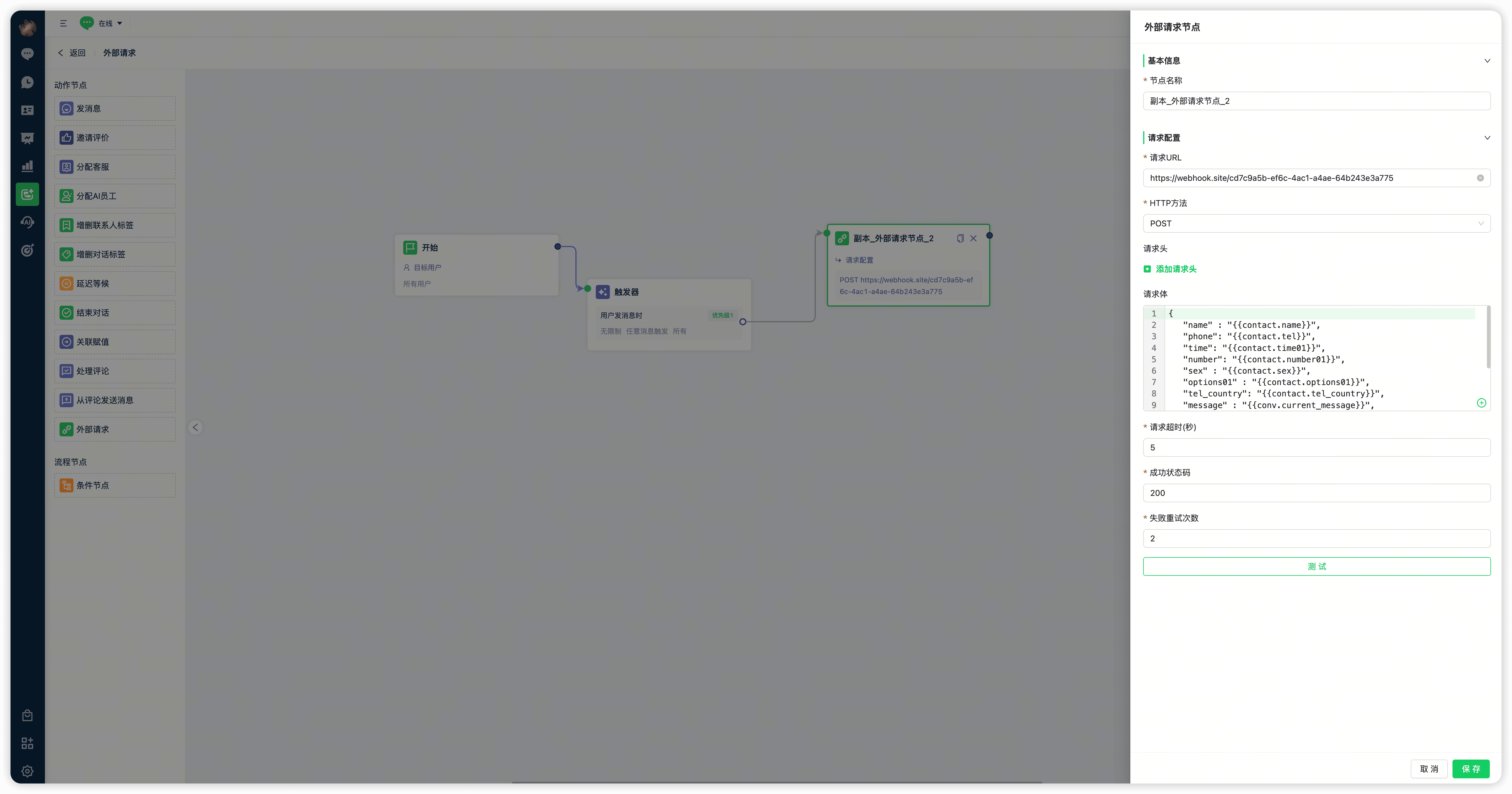
External Request node configuration
Advanced functionality
The current version supports basic outbound data delivery. Response mapping—writing external API response data back into Mixdesk—is a custom service requiring additional business-logic integration. Availability and scheduling are assessed according to your paid engagement and business priorities. Contact the sales team to discuss this requirement.
Contact us if you need help configuring the node.