
This guide assumes basic experience developing Android apps and familiarity with the relevant concepts.
Repository:GitHub Android
Screenshots
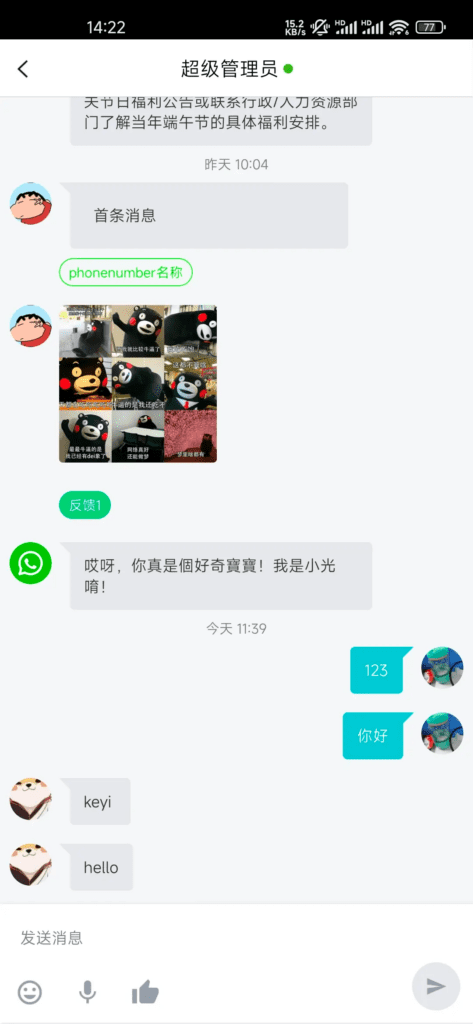
Integrate the Mixdesk SDK
Requirements
- JDK7+
Android Studio
In your build.gradle file, add these dependencies:
implementation 'com.mixdesk:androidx:0.0.1'
implementation 'com.github.bumptech.glide:glide:4.9.0'
annotationProcessor 'com.github.bumptech.glide:compiler:4.9.0'
If you use Glide 3.x, refer to its configuration documentation.
Use Mixdesk
1. Initialize
MXConfig.init(this, "Your Appkey", new OnInitCallback() {
    @Override
    public void onSuccess(String clientId) {
        Toast.makeText(MainActivity.this, "init success", Toast.LENGTH_SHORT).show();
    }
    @Override
    public void onFailure(int code, String message) {
        Toast.makeText(MainActivity.this, "int failure", Toast.LENGTH_SHORT).show();
    }
});
Find your AppKey by signing in as a Mixdesk administrator and opening Channels > App SDK.
2. Open the conversation screen
After initialization succeeds, open the conversation screen.
Intent intent = new MXIntentBuilder(this).build();
startActivity(intent);
3. Android M permissions
For Android M compatibility, handle runtime permissions. See Demo.
4. Android O permissions
For Android O compatibility, close the Mixdesk service when the app enters the background.
MXManager.getInstance(context).closeMixdeskService();5. Common use cases
Bind your own account identifier
If your app has its own accounts and each user needs separate chat history, bind the account when opening a conversation:
Intent intent = new MXIntentBuilder(this)
        .setCustomizedId("Developer-defined ID") // The same ID identifies the same customer
        .build();
startActivity(intent);
Set customer information
Upload or update custom user information when a customer comes online:
HashMap<String, String> clientInfo = new HashMap<>();
clientInfo.put("name", "Yoshihiro Togashi");
clientInfo.put("avatar", "https://s3.cn-north-1.amazonaws.com.cn/pics.meiqia.bucket/1dee88eabfbd7bd4");
clientInfo.put("gender", "Male");
clientInfo.put("tel", "1300000000");
clientInfo.put("Skill 1", "On hiatus");

HashMap<String, String> updateInfo = new HashMap<>();
updateInfo.put("name", "update name");

Intent intent = new MXIntentBuilder(this)
        .setClientInfo(clientInfo) // Set customer information: note: This API takes effect only once,To update customer information,use the update API
//      .updateClientInfo(updateInfo) // Update customer information: note: Updates overwrite information previously edited by a team member in the workspace
        .build();
startActivity(intent);
API reference
The SDK provides the following APIs:
- Bring the current client online
- Bind a Mixdesk ID and go online
- Bind a custom ID and go online
- Set the customer offline
- Send text, image, or audio messages
- Get history from the server
- Get history from local storage
- Set the device’s unique identifier
- Set custom customer information
- Get the assigned team member’s information
- Get the current customer ID
- Create a new customer
- Update message read status
- End the current conversation
- Send a typing indicator
- Switch the current customer
- Get unread messages
- Receive real-time messages
- Get the SDK version
- Offline push notifications
- Set the push-notification server URL
- Set the device’s unique identifier
- Close the Mixdesk service
- Open the Mixdesk service
- Push-message data structure
After obtaining an MXManager instance,
MXManager mxManager = MXManager.getInstacne(context);
call these APIs:
Bring the current client online
Initialization creates a default customer. Unless you change the customer ID, that customer is brought online.
/**
* Bring the current client online
*
* @param onlineCallback Callback
*/
setCurrentClientOnline(final OnClientOnlineCallback onlineCallback)
Bind a Mixdesk ID and go online
Use Get Current Customer ID to obtain and store the Mixdesk ID in your backend, linking it to your user account. Pass the saved ID to this API to bring that customer online and make it the current customer.
/**
 * Bind a Mixdesk ID and bring the customer online
 *
 * @param mxClientId     Mixdesk id
 * @param onlineCallback Callback interface
*/
setClientOnlineWithClientId(String mxClientId, final OnClientOnlineCallback onlineCallback)
MXConversationActivity.class calls this API internally, so you can construct the intent using MXIntentBuilder.
Example:
// Assume mixdesk_id is a customer ID generated by Mixdesk
Intent intent = new MXIntentBuilder(this)
        .setClientId(mixdesk_id)
        .build();
startActivity(intent);
Bind a custom ID and go online
Alternatively, pass your own user ID. Mixdesk binds it to a customer, and subsequent calls with the same custom ID bring that customer online. That customer becomes the current customer.
Do not use an auto-incrementing custom ID, which can expose users to impersonation. Store the Mixdesk customer ID if needed. Custom IDs must be strings of no more than 32 characters.
Generate a unique ID for each customer. Reusing IDs can expose one customer’s messages to another.
/**
* Bind a custom ID and bring the customer online
*
* @param customizedId   Custom ID
* @param onlineCallback Callback interface
*/
setClientOnlineWithCustomizedId(String customizedId, final OnClientOnlineCallback onlineCallback)
MXConversationActivity.class calls this API internally, so you can construct the intent using MXIntentBuilder.
Example:
// Assume developer@dev.com  is your user ID
Intent intent = new MXIntentBuilder(this)
        .setCustomizedId("developer@dev.com") // The same ID identifies the same customer
        .build();
startActivity(intent);
Set the customer offline
Setting a customer offline stops real-time message listening and broadcasts.
If a push server is configured in Mixdesk, messages for an offline customer are sent to your backend.
To keep receiving messages after leaving the chat screen, leave the customer online and listen for new-message broadcasts.
/**
* Set the customer offline.
* Call only after successful initialization.
* Messages will be sent to the configured push server.
*/
setClientOffline()
Send text, image, or audio messages
/**
 * Send a text message
 *
 * @param content               Message content
 * @param onMessageSendCallback Message-status callback
*/
sendTextMessage(String content, final OnMessageSendCallback onMessageSendCallback)
/**
 * Send an image message
 *
 * @param localPath             Local image path
 * @param onMessageSendCallback Message-status callback
 */
sendPhotoMessage(String localPath, final OnMessageSendCallback onMessageSendCallback)
/**
 * Send an audio message
 *
 * @param localPath             Local audio path
 * @param onMessageSendCallback Message-status callback
 */
sendVoiceMessage(String localPath, final OnMessageSendCallback onMessageSendCallback)
Get history from the server
/**
 * Get history from the server
 *
 * @param lastMessageCreateOn  Get messages before this date
 * @param length               Number of messages to retrieve
 * @param onGetMessageListCallback Callback
 */
getMessageFromService(final long lastMessageCreateOn, final int length, final OnGetMessageListCallback onGetMessageListCallback)
Get history from local storage
/**
 * Get history from the server
 *
 * @param lastMessageCreateOn  Get messages before this date
 * @param length               Number of messages to retrieve
 * @param onGetMessageListCallback Callback
 */
getMessageFromDatabase(final long lastMessageCreateOn, final int length, final OnGetMessageListCallback onGetMessageListCallback)
Set the device’s unique identifier
/**
 * Set the device’s unique identifier
 *
 * @param token Unique identifier
 */
registerDeviceToken(String token, OkHttpUtils.OnRegisterDeviceTokenCallback onRegisterDeviceTokenCallback)

App When the app is in the background, push data sent to your backend includes deviceToken.

MixdeskSee Push-message Data Structure for the payload format.
Set custom customer information
/**
 * Set customer details shown to team members
 *
 * @param clientInfo           Customer information
 * @param onClientInfoCallback Callback
 */
setClientInfo(Map<String, String> clientInfo, OnClientInfoCallback onClientInfoCallback)
Upload user attributes to help team members support customers. Example:
Map<String, String> info = new HashMap<>();
info.put("name", "Yoshihiro Togashi");
info.put("avatar", "https://s3.cn-north-1.amazonaws.com.cn/pics.meiqia.bucket/1dee88eabfbd7bd4");
info.put("gender", "Male");
info.put("tel", "111111");
info.put("Skill 1", "On hiatus");
info.put("Skill 2", "Research trip");
info.put("Skill 3", "Playing mahjong");
MXManager.getInstance(context).setClientInfo(info, new OnClientInfoCallback());
MQConversationActivity.class calls this API internally, so you can construct the intent using MQIntentBuilder.
HashMap<String, String> clientInfo = new HashMap<>();
clientInfo.put("name", "Yoshihiro Togashi");
clientInfo.put("avatar", "https://s3.cn-north-1.amazonaws.com.cn/pics.meiqia.bucket/1dee88eabfbd7bd4");
clientInfo.put("gender", "Male");
clientInfo.put("tel", "1300000000");
clientInfo.put("Skill 1", "On hiatus");
Intent intent = new MXIntentBuilder(this)
        .setClientInfo(clientInfo)
        .build();
startActivity(intent);
The following predefined fields can be set through the API described above:
| Key | Description |
|---|---|
| name | Real name |
| tel | Phone |
| comment | Notes |
| avatar | Avatar URL |
| tags | Tags as an array; tags must already exist in the workspace |
Get the assigned team member’s information
/**
 * Get the assigned team member’s information
 *
 * @return Returns the current team member’s information, or null if none is assigned
 */
getCurrentAgent()
Get the current customer ID
/**
 * Get and store the current customer ID. Use setClientOnlineWithMQClientId to bring that customer online later.
 *
 * @return Current customer ID
 */
getCurrentClientId()
Create a new customer
/**
 * Create a new customer
 *
 * @param onGetMQClientIdCallBack Callback
 */
createClient(OnGetMQClientIdCallBackOn onGetMQClientIdCallBack)
Call this API to initialize a new customer.
The new customer has no history or user information.
Update message read status
/**
 * Update message read status
 *
 * @param messageId Message ID
 * @param isRead    Replacement status
 */
updateMessage(long messageId, boolean isRead)
End the current conversation
/**
 * End the current conversation
 *
 * @param onEndConversationCallback Callback
 */
endCurrentConversation(OnEndConversationCallback onEndConversationCallback)
Send a typing indicator
/**
 * Send the customer’s draft to the team member as a typing indicator. Calls are unrestricted, but data is sent to the server at most once per second.
 *
 * @param content Text being typed
 */
sendClientInputtingWithContent(String content)
Switch the current customer
/**
 * Switch the current customer
 *
 * @param clientIdOrCustomizedId clientId or customized
 * @param simpleCallback         Callback
 */
MQManager.getInstance(context).setCurrentClient(String clientIdOrCustomizedId, SimpleCallback simpleCallback);
Get unread messages
Messages received after leaving the chat screen count as unread.
/**
 * Get unread messages for the current client
 *
 * @param onGetMessageListCallback Callback
 */
MQManager.getInstance(context).getUnreadMessages(new OnGetMessageListCallback());

/**
 * Get unread messages for a specified ClientId or customized customer
 *
 * @param clientIdOrCustomizedId   clientId or customized
 * @param onGetMessageListCallback Callback
 */
MQManager.getInstance(context).getUnreadMessages(String clientIdOrCustomizedId, new OnGetMessageListCallback());
Receive real-time messages
When offline push is disabled, register a BroadcastReceiver to listen for broadcasts.
Use LocalBroadcastManager to register and unregister the BroadcastReceiver.
Example:
// Register
LocalBroadcastManager.getInstance(this).registerReceiver(messageReceiver, intentFilter);
// Unregister
LocalBroadcastManager.getInstance(this).unregisterReceiver(messageReceiver);
BroadcastReceiver:
public class MessageReceiver extends BroadcastReceiver {
    @Override
    public void onReceive(Context context, Intent intent) {
         // Get ACTION
         final String action = intent.getAction();
         // Receive a new message
         if (MXMessageManager.ACTION_NEW_MESSAGE_RECEIVED.equals(action)) {
             // Get the message ID from the intent
             String msgId = intent.getStringExtra("msgId");
             // Get the message object from MCMessageManager
             MXMessageManager messageManager = MXMessageManager.getInstance(context);

         }
         // Team member is typing
         else if (MXMessageManager.ACTION_AGENT_INPUTTING.equals(action)) {
             // do something
         }
         // Conversation transferred
         else if (MXMessageManager.ACTION_AGENT_CHANGE_EVENT.equals(action)) {
             // Get the newly assigned team member
             MXAgent mxAgent = messageManager.getCurrentAgent();
             // do something
         }
     }
 }
Get the SDK version
/**
 * Get the SDK version.
 */
getSDKVersion()
Set the device’s unique identifier
/**
 * Set the device’s unique identifier
 *
 * @param token Unique identifier
 */
registerDeviceToken(String token, OkHttpUtils.OnRegisterDeviceTokenCallback onRegisterDeviceTokenCallback)
When the Mixdesk service is closed, push payloads sent to your backend include deviceToken.
Close the Mixdesk service
Closing the service stops message listening. Mixdesk then pushes messages to your configured backend:
MQManager.getInstance(context).closeService();Close the service when the app enters the background. Reopen it in the foreground if real-time listening is needed.
Open the Mixdesk service
Opening the service resumes message listening, and Mixdesk stops pushing messages to your backend:
MQManager.getInstance(context).openService();Close the service when the app enters the background. Reopen it in the foreground if real-time listening is needed.
Customize the UI
Use configuration files
| Custom attribute | Description | Default |
|---|---|---|
| MXConfig.ui.titleGravity | Center: MXTitleGravity.CENTER; left: MXTitleGravity.LEFT | MXTitleGravity.CENTER |
Use resource files
Override resource IDs in your project. Common attributes are listed here; for other customization, inspect and override the relevant IDs in the SDK source.
| Custom attribute | Description |
|---|---|
| mx_activity_bg | Activity background color resource |
| mx_activity_title_textColor | Title-bar text color resource |
| mx_chat_left_textColor | Left message-bubble text color resource |
| mx_chat_right_textColor | Right message-bubble text color resource |
| mx_chat_left_bubble | Left message-bubble background color resource |
| mx_chat_right_bubble | Right message-bubble background color resource |
| mx_ic_back.png | Back-arrow image resource |
Use Java code
The following properties can be configured through Java, though this approach is not recommended.
| Custom attribute | Description |
|---|---|
| MXConfig.ui.backArrowIconResId | Title-bar back-arrow resource ID |
| MXConfig.ui.titleBackgroundResId | Title-bar background color resource ID |
| MXConfig.ui.titleTextColorResId | Title-bar text color resource ID |
| MXConfig.ui.leftChatBubbleColorResId | Left message-bubble background resource ID |
| MXConfig.ui.rightChatBubbleColorResId | Right message-bubble background resource ID |
| MXConfig.ui.leftChatTextColorResId | Left message-bubble text color resource ID |
| MXConfig.ui.rightChatTextColorResId | Right message-bubble text color resource ID |
Customize behavior
| Property description | Description | Default |
|---|---|---|
| MXConfig.isVoiceSwitchOpen | Enable audio | Default: true |
| MXConfig.isSoundSwitchOpen | Enable notification sounds | Default: true |
| MXConfig.isLoadMessagesFromNativeOpen | Load local data | Default: false |
| MXConfig.isShowClientAvatar | Show customer avatar | Default: false |
Code obfuscation
If your project uses obfuscation, add these rules to proguard-rules.pro :
# OkHttpRelated
-keepattributes Signature
-keepattributes *Annotation*
-keep class com.squareup.okhttp3.** { *; }
-keep interface com.squareup.okhttp3.** { *; }
-dontwarn com.squareup.okhttp3.**

# OkioRelated
-keep class sun.misc.Unsafe { *; }
-dontwarn java.nio.file.*
-dontwarn org.codehaus.mojo.animal_sniffer.IgnoreJRERequirement
-dontwarn okio.**

# UILRelated
-keep class com.nostra13.universalimageloader.** { *; }
-keepclassmembers class com.nostra13.universalimageloader.** {*;}
-dontwarn com.nostra13.universalimageloader.**

# GlideRelated
-keep class com.bumptech.glide.Glide { *; }
-keep public class * implements com.bumptech.glide.module.GlideModule
-keep public enum com.bumptech.glide.load.resource.bitmap.ImageHeaderParser$** {
  **[] $VALUES;
  public *;
}
-dontwarn com.bumptech.glide.**

# PicassoRelated
-keep class com.squareup.picasso.Picasso { *; }
-dontwarn com.squareup.okhttp.**
-dontwarn com.squareup.picasso.**

# xUtils3Related
-keepattributes Signature,*Annotation*
-keep public class org.xutils.** {
    public protected *;
}
-keep public interface org.xutils.** {
    public protected *;
}
-keepclassmembers class * extends org.xutils.** {
    public protected *;
}
-keepclassmembers @org.xutils.db.annotation.* class * {*;}
-keepclassmembers @org.xutils.http.annotation.* class * {*;}
-keepclassmembers class * {
    @org.xutils.view.annotation.Event <methods>;
}
-dontwarn org.xutils.**